Create a session, set the place and groups, and let it repeat every week.
For coachesUpdated July 2026
Only a title and a date are genuinely required. Everything else on the form is there when you need it and out of your way when you do not. Most coaches set up their recurring weekly sessions once and barely touch the form again.
Start a new training
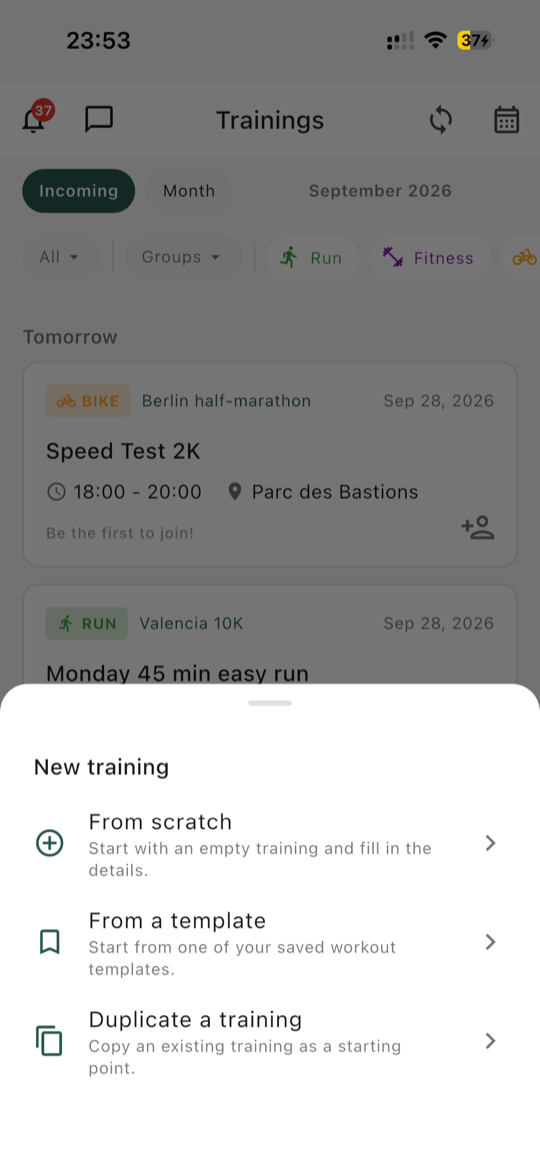
Go to the Trainings tab and start a new one. You get three ways in:
From scratch, an empty form.
From a template, if you have saved workout templates.
Duplicate a training, which copies an existing session as a starting point. This is usually the fastest option once your season is under way.
Three ways to start a training.
Fill in the form
Choose the training type
Running, Swimming, Cycling, Fitness, or Multisport. Konia preselects one based on your club type, so this is often already right. There is no triathlon training type, so a triathlon club starts on Running and you pick per session.
Add a title
The only mandatory text field. Keep it recognisable at a glance in a list: "Tuesday intervals" beats "Training". Add a description if there is something people need to read before turning up.
Allow comments is on by default, which lets members ask questions on the session itself. Turning it off later hides the input but keeps the existing thread readable.
Set the date and time
Pick the date, then choose between two time modes:
Fixed time, the default, with a start and an end. Use it for anything the club does together.
Free time, which sets no time slot at all. Members do the session whenever suits them that day. This is the one for "long run this Sunday, go at your own hour".
Set the location
Type it in, or pick one of your saved training places. Saved places carry their own photo, description, and map link, so members who have never been there can actually find it. You can add a Google Maps link directly too.
Choose the groups
If your club uses training groups, select which ones this session is for. Leave it empty and the session is for the whole club.
Add equipment, a coach, and files
Pick the equipment members should bring, from your club's list or as a custom entry. Assign a coach from your club's admins. Attach a PDF or image for anything members should read beforehand. Running, cycling, and multisport sessions also get a GPX route file field, so members can load the route onto their watch, or send it straight to a Garmin watch with Send route to my watch. Swimming and fitness sessions have no GPX field. Both uploads are capped at 5 MB.
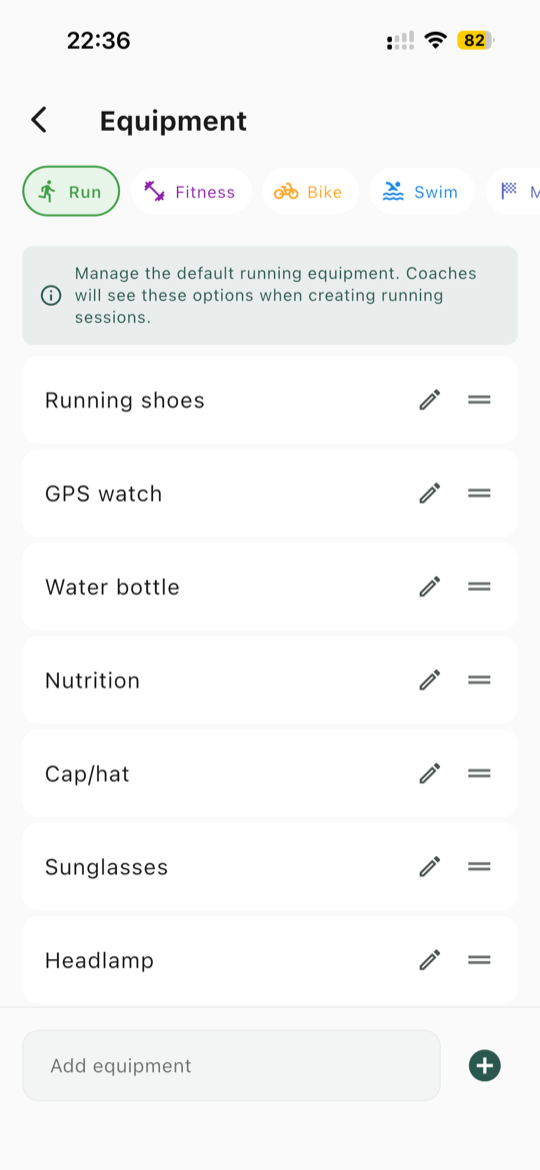
Your club's list is set up in Manage club, under Equipment, one list per training type. Coaches see the matching list when they create a session.
Equipment, in Manage club: here the running list.
Save
Use the save action at the top or the large button at the bottom of the form. Both do the same thing.
Important: training groups control who gets notified, not who can attend. A member outside the selected groups can still see the session and sign up. Use groups to keep notifications relevant, not as a way to make a session private.
Make it repeat
If the session happens every week, turn on Recurring training and set the pattern:
Repeat every so many weeks or months.
Repeat on the weekdays it falls on. A Tuesday and Thursday session is one recurring training, not two.
Ends: never, on a specific date, or after a set number of occurrences. Note that "never" is not literally forever, Konia generates up to 52 occurrences, so a weekly session gives you about a year. Ending on a date is handy for a season or a training block.
Editing or deleting a session in a series always asks whether you mean this one occurrence or this one and everything after it, so fixing a single week never disturbs the rest.
Organizing a weekly group run? The page for running groups shows the whole setup.
Tip: if you leave the date and time at their defaults, Konia asks whether you meant to before saving. It is an easy mistake to make when you are creating several sessions in a row.
Cancelling a session
Weather happens. On the training's detail screen, use Cancel training. The session stays visible in the list with a clear cancelled badge, and everyone signed up gets a notification, which is the whole point: nobody turns up to an empty car park.
Reactivate training puts it back if the forecast improves. For a recurring series you can cancel just the one occurrence.
Seuls un titre et une date sont réellement obligatoires. Tout le reste du formulaire est là quand vous en avez besoin et s'efface quand ce n'est pas le cas. La plupart des coachs configurent leurs séances hebdomadaires une fois et ne retouchent presque plus le formulaire.
Créer un nouvel entraînement
Allez dans l'onglet Séances et créez-en une. Trois points d'entrée :
Partir de zéro, un formulaire vierge.
À partir d'un modèle, si vous avez enregistré des modèles d'entraînement.
Dupliquer un entraînement, qui copie une séance existante comme point de départ. C'est en général le plus rapide une fois la saison lancée.
Trois façons de créer une séance.
Remplir le formulaire
Choisissez le type d'entraînement
Course, Natation, Vélo, Fitness ou Multisport. Konia en présélectionne un selon le type de votre club, c'est donc souvent déjà bon. Il n'existe pas de type d'entraînement triathlon : un club de triathlon démarre sur Course à pied et vous choisissez séance par séance.
Ajoutez un titre
Le seul champ texte obligatoire. Faites en sorte qu'il soit reconnaissable d'un coup d'œil dans une liste : « Fractionné du mardi » vaut mieux que « Entraînement ». Ajoutez une description s'il y a quelque chose à lire avant de venir.
Autoriser les commentaires est activé par défaut, ce qui permet aux membres de poser des questions sur la séance. Le désactiver plus tard masque le champ de saisie mais laisse la discussion existante lisible.
Définissez la date et l'heure
Choisissez la date, puis l'un des deux modes horaires :
Heure fixe, par défaut, avec un début et une fin. Pour tout ce que le club fait ensemble.
Heure libre, qui ne fixe aucun créneau. Les membres font la séance quand ils veulent ce jour-là. C'est le mode pour « sortie longue dimanche, chacun à son heure ».
Indiquez le lieu
Saisissez-le, ou choisissez l'un de vos lieux d'entraînement enregistrés. Les lieux enregistrés ont leur photo, leur description et leur lien vers la carte, pour que les membres qui n'y sont jamais allés le trouvent vraiment. Vous pouvez aussi ajouter un lien Google Maps directement.
Choisissez les groupes
Si votre club utilise des groupes d'entraînement, sélectionnez ceux concernés par la séance. Laissez vide et la séance s'adresse à tout le club.
Ajoutez le matériel, un coach et des fichiers
Indiquez le matériel à apporter, depuis la liste de votre club ou en saisie libre. Assignez un coach parmi les administrateurs du club. Joignez un PDF ou une image pour tout ce que les membres doivent lire avant. Les séances de course, de vélo et multisport disposent en plus d'un champ fichier GPX, pour que les membres chargent le parcours sur leur montre, ou l'envoient directement sur une montre Garmin avec Envoyer le parcours vers ma montre. Les séances de natation et de fitness n'ont pas de champ GPX. Les deux envois sont limités à 5 Mo.
La liste du club se gère dans Gérer le club, sous Équipements, avec une liste par type d'entraînement. Les coachs voient la liste correspondante quand ils créent une séance.
Équipements, dans Gérer le club : ici la liste pour la course à pied.
Enregistrez
Utilisez l'action en haut ou le grand bouton en bas du formulaire. Les deux font la même chose.
Important : les groupes d'entraînement déterminent qui est notifié, pas qui peut participer. Un membre hors des groupes sélectionnés voit quand même la séance et peut s'y inscrire. Utilisez les groupes pour garder des notifications pertinentes, pas pour rendre une séance privée.
La faire se répéter
Si la séance a lieu chaque semaine, activez Entraînement récurrent et définissez le rythme :
Répéter toutes les N semaines ou N mois.
Répéter le ou les jours concernés. Une séance mardi et jeudi est un seul entraînement récurrent, pas deux.
Fin : jamais, à une date précise, ou après un nombre d'occurrences. Notez que « jamais » n'est pas littéralement infini : Konia génère jusqu'à 52 occurrences, ce qui donne environ un an pour une séance hebdomadaire. Terminer à une date est pratique pour une saison ou un bloc d'entraînement.
Modifier ou supprimer une séance d'une série demande toujours si vous visez cette occurrence ou celle-ci et toutes les suivantes : corriger une seule semaine ne perturbe jamais le reste.
Vous organisez une sortie de groupe chaque semaine ? La page consacrée aux groupes de course montre toute la mise en place.
Conseil : si vous laissez la date et l'heure par défaut, Konia vous demande confirmation avant d'enregistrer. L'erreur est vite arrivée quand on crée plusieurs séances à la suite.
Annuler une séance
La météo décide parfois. Sur l'écran de détail de l'entraînement, utilisez Annuler l'entraînement. La séance reste visible dans la liste avec un badge d'annulation clair, et toutes les personnes inscrites reçoivent une notification. C'est tout l'intérêt : personne ne se déplace pour rien.
Réactiver l'entraînement le remet en place si les prévisions s'améliorent. Pour une série récurrente, vous pouvez n'annuler qu'une seule occurrence.
La suite
Wirklich nötig sind nur ein Titel und ein Datum. Alles andere im Formular ist da, wenn du es brauchst, und im Weg, wenn nicht. Die meisten Coaches legen ihre wöchentlichen Einheiten einmal an und fassen das Formular danach kaum noch an.
Ein neues Training anlegen
Geh zum Tab Trainings und leg eines an. Es gibt drei Wege hinein:
Von Grund auf, ein leeres Formular.
Aus einer Vorlage, wenn du Workout-Vorlagen gespeichert hast.
Training duplizieren, das eine bestehende Einheit als Ausgangspunkt kopiert. Sobald die Saison läuft, ist das meist der schnellste Weg.
Drei Wege, ein Training anzulegen.
Das Formular ausfüllen
Trainingsart wählen
Laufen, Schwimmen, Radfahren, Fitness oder Multisport. Konia wählt anhand eures Vereinstyps eine vor, oft stimmt es also schon. Eine Trainingsart Triathlon gibt es nicht, ein Triathlonverein startet daher bei Laufen und du wählst pro Einheit.
Titel eingeben
Das einzige Pflichtfeld mit Text. Er sollte in einer Liste auf einen Blick erkennbar sein: „Dienstags-Intervalle" ist besser als „Training". Ergänze eine Beschreibung, wenn es etwas gibt, das man vorher wissen muss.
Kommentare erlauben ist standardmässig an, damit Mitglieder direkt bei der Einheit nachfragen können. Später ausgeschaltet verschwindet das Eingabefeld, die bisherigen Kommentare bleiben lesbar.
Datum und Zeit festlegen
Wähle das Datum und dann einen der beiden Zeitmodi:
Feste Zeit, die Voreinstellung, mit Start und Ende. Für alles, was der Verein gemeinsam macht.
Freie Zeit, ganz ohne Zeitfenster. Die Mitglieder machen die Einheit an dem Tag, wann es ihnen passt. Genau richtig für „langer Lauf am Sonntag, jede und jeder zur eigenen Zeit".
Ort angeben
Tipp ihn ein oder wähle einen eurer gespeicherten Trainingsorte. Gespeicherte Orte haben ein eigenes Foto, eine Beschreibung und einen Kartenlink, damit auch Leute hinfinden, die noch nie dort waren. Einen Google-Maps-Link kannst du ebenfalls direkt hinterlegen.
Gruppen wählen
Wenn euer Verein Trainingsgruppen nutzt, wähle die betroffenen aus. Lässt du das Feld leer, gilt die Einheit für den ganzen Verein.
Ausrüstung, Coach und Dateien ergänzen
Wähle die Ausrüstung, die mitgebracht werden soll, aus eurer Vereinsliste oder als eigenen Eintrag. Weise eine Coach-Person aus den Vereins-Admins zu. Häng ein PDF oder Bild an für alles, was Mitglieder vorher lesen sollen. Lauf-, Rad- und Multisport-Einheiten haben zusätzlich ein Feld für eine GPX-Datei, damit Mitglieder die Route auf die Uhr laden oder sie mit Strecke an meine Uhr senden direkt an eine Garmin-Uhr schicken können. Schwimm- und Fitness-Einheiten haben kein GPX-Feld. Beide Uploads sind auf 5 MB begrenzt.
Die Liste des Vereins pflegst du unter Verein verwalten, bei Ausrüstung, eine Liste pro Trainingsart. Coaches sehen beim Anlegen einer Einheit die passende Liste.
Ausrüstung unter Verein verwalten, hier die Liste fürs Laufen.
Speichern
Nimm die Aktion oben oder den grossen Button am Ende des Formulars. Beide tun dasselbe.
Wichtig: Trainingsgruppen steuern, wer benachrichtigt wird, nicht wer teilnehmen darf. Ein Mitglied ausserhalb der gewählten Gruppen sieht die Einheit trotzdem und kann sich anmelden. Nutze Gruppen, damit Benachrichtigungen relevant bleiben, nicht um eine Einheit privat zu machen.
Wiederholen lassen
Findet die Einheit jede Woche statt, schalte Wiederkehrendes Training ein und leg das Muster fest:
Wiederholen alle N Wochen oder N Monate.
Wiederholen am jeweiligen Wochentag. Eine Einheit dienstags und donnerstags ist ein wiederkehrendes Training, nicht zwei.
Endet: nie, an einem bestimmten Datum oder nach einer Anzahl Wiederholungen. Beachte, dass „nie" nicht wörtlich unendlich heisst: Konia erzeugt bis zu 52 Wiederholungen, bei einer wöchentlichen Einheit also rund ein Jahr. Ein Enddatum passt gut zu einer Saison oder einem Trainingsblock.
Beim Bearbeiten oder Löschen einer Einheit aus einer Serie fragt Konia immer, ob du diese eine Wiederholung meinst oder diese und alle folgenden. Eine einzelne Woche zu korrigieren stört den Rest also nie.
Du organisierst einen wöchentlichen Lauftreff? Auf der Seite für Laufgruppen siehst du alles, was du dafür brauchst.
Tipp: Wenn du Datum und Zeit auf den Voreinstellungen lässt, fragt Konia vor dem Speichern nach. Das passiert schnell, wenn man mehrere Einheiten hintereinander anlegt.
Eine Einheit absagen
Wetter ist Wetter. Nutze auf der Detailseite des Trainings Training absagen. Die Einheit bleibt mit einem deutlichen Abgesagt-Hinweis in der Liste sichtbar, und alle Angemeldeten bekommen eine Benachrichtigung. Genau darum geht es: Niemand steht umsonst am Treffpunkt.
Training reaktivieren holt sie zurück, wenn die Prognose besser wird. Bei einer Serie kannst du auch nur diese eine Wiederholung absagen.
Als Nächstes
Ready to give your club a home?
Download Konia today, it is free, and bring your club together.